Last Updated:2025.03.22
- #topics
Super Sentai Development Blog vol.234: ショドウフォン -MEMORIAL EDITION- Specifications Introduction!
Hello everyone
I'm in charge of development for ショドウフォン -MEMORIAL EDITION- .
We would like to introduce "Shodophone -MEMORIAL DIITION-," which became available for pre-order on February 14th. This time, we will explain details that could not be included or fully conveyed on the pre-order page.
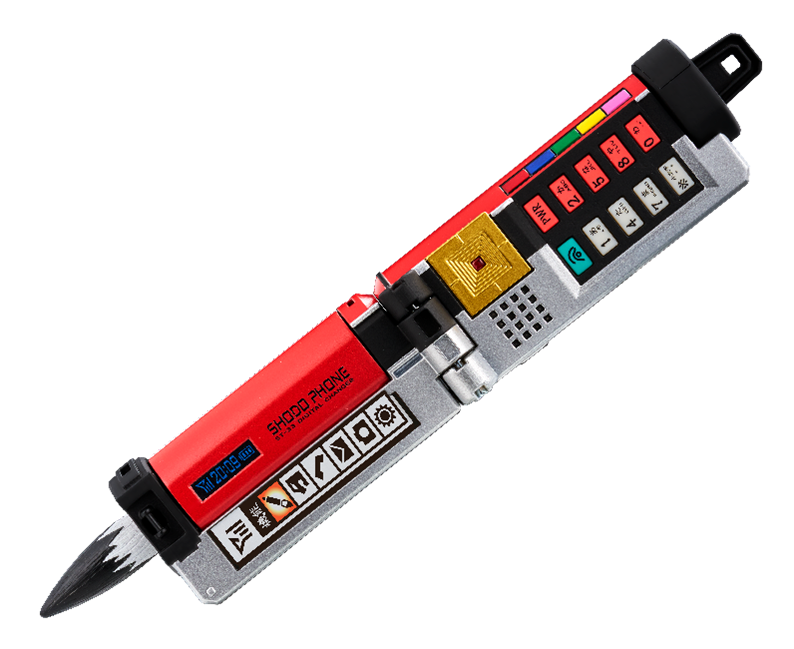
● Lettering gimmick
The main feature of this product is the writing game, but in the movie, the letters appear to float when written in the air. Since it is difficult to actually reproduce this effect, we considered how we could recreate the "feeling of writing" using means other than sight.
Therefore, we focused on the sense of touch, one of the five human senses. To express the resistance felt in the hand when writing, we incorporated a vibration motor inside.
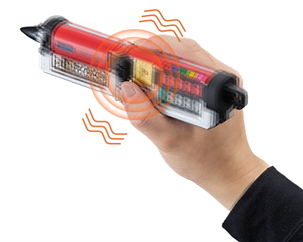
It is said that the more sensory information a person receives, the greater their sense of immersion becomes.
We want to provide a more immersive writing experience by allowing users to see, hear, and feel vibrations through their fingers.
Furthermore, the -MEMORIAL EDITION- includes a new "text writing button" that was not present in the DX version!
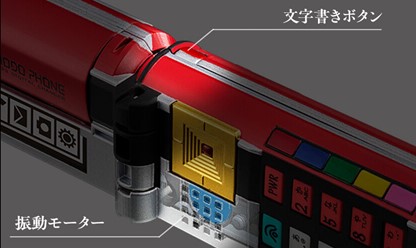
In the DX version, the brush-writing sound would automatically start when you transformed into brush mode, but this time, we've added a character-writing button, allowing you to start writing characters at your own timing. Pressing the button once plays the sound for one stroke, so you can freely write any character you like. You can write "fire" to transform into Red, of course, but you can also write "wood" or "heaven" to transform into a different character. It might be fun to write your favorite kanji, or even katakana or English words to create your own original transformation play!
While you press this writing button, the memorable writing sound from the film and the newly added vibration will be activated. (The writing sound is based on the audio from the film, so depending on how long you hold the button down, the sound may end first. The vibration will also stop after a certain period of time.)
● Text inversion function
After finishing writing the characters, a "clang!" sound is heard as the character shakes off the Shodophone, and the written characters are reversed. Then, by pressing the call button on the edge, the scene transitions to the suit and mask being put on. We wanted to recreate the transformation scene from the show as much as possible with this Shodophone, so we made sure that this character reversal effect could be performed.
In the show, after finishing writing the characters, the character raises the Shodophone (making a movement to build momentum) and then reverses the characters. This reversal function is implemented by using the time spent raising the phone after writing the characters to differentiate the electrical processing depending on whether the time between pressing the writing button and pressing it again is short or long. The image below illustrates this.
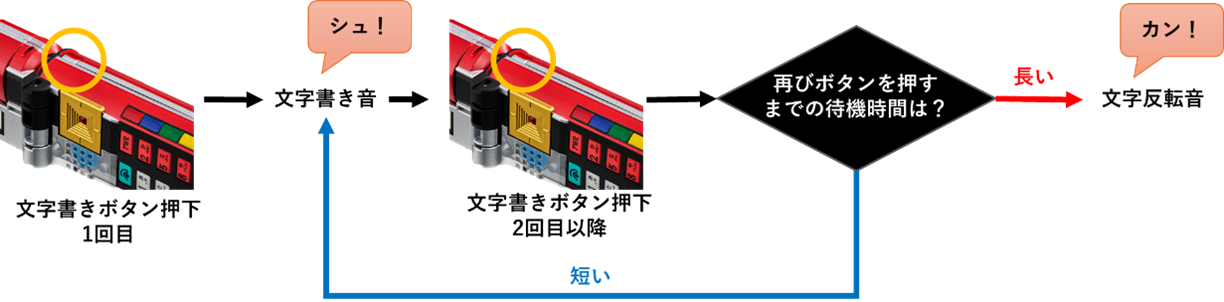
The system works as follows: if the time between pressing the button is short, the sound of writing characters continues; if the time is long, the sound of reversing characters plays. This mechanism means that even while pressing the same button, the sound of writing characters switches to the sound of reversing characters depending on the time between pressing the button.
●Regarding each mode
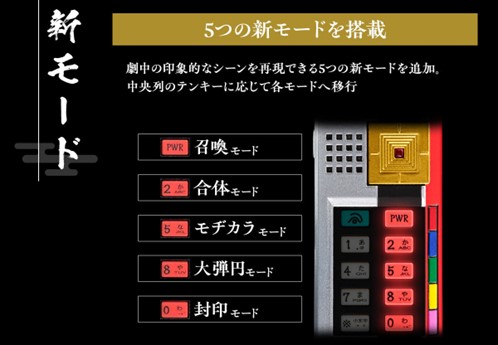
Since we couldn't go into detail about this on the order page, I'd like to explain it in more detail.
Summoning Mode
Pressing the "PWR" keypad while in brush mode will activate summoning mode. This is the mode for summoning Origami, and unlike the writing sound during transformation in the show, it features a distinctive sound with a slight echo. This echoing writing sound has also been reproduced.
When summoning an Origami, the character is not reversed; simply writing the character "大" (dai) will cause the Origami to grow to a gigantic size. In this mode as well, writing the third stroke of "大" will automatically trigger the sound effect for summoning the Origami, followed by the cry of the growing Origami.
- Combined Mode
This mode allows you to perform a samurai fusion by writing the character "合" (go). Press the "2" key on the numeric keypad to switch to fusion mode.
By pressing the writing button to write characters and performing the character reversal action explained in the transformation mode, you can enjoy the Samurai Combination effect! Some of the combination sounds from the show are also included, so we hope you will enjoy becoming a Shinkenger and experiencing the Samurai Combination.
Incidentally, in this combined mode, there are no restrictions on the number of strokes you can write using the writing button, so you can write freely. You can even recreate the shortened combined form that was shown in the show with just one stroke, so you can activate the combined form at the moment you want to perform the samurai combined form!
・Mojikara Mode
This is the mode in which the Mojikara, which was frequently shown in the show, is activated. There were scenes in various situations where this Mojikara was used, such as before transforming or while fighting enemies after transforming. You can switch to this mode by pressing the "5" key on the numeric keypad.
While various types of Mojikara were used in the show, the sounds they produced when activated were also diverse. Therefore, this time we've narrowed it down to three sound patterns, and these three patterns will play in sequence. Just like with the combined mode, there are no restrictions on the number of strokes in the characters you write, so you can write characters that are meaningful to you, or you can have fun writing characters that didn't appear in the show!
・Happy ending mode
Samurai Haoh is the strongest robot from Shinkenger. Its immense size when combined truly gives off the feeling of being the ultimate final robot! This mode is accessed by pressing the "8" key on the numeric keypad.
In the grand finale mode, the Shinkengers write the names of the Origami, but there are no restrictions on the number of strokes, so please enjoy writing the names of your favorite Origami. Just like in the transformation mode, after writing the names, hold the toy once and then press the writing button again to start the reversed lettering effect. The memorable "clang, clang, clang..." sound of wooden clappers plays during the grand finale mode, so please pick it up and play with it. Also, in the grand finale mode in the show, attack sounds play after this, and the enemy is defeated. During the performance of these attack sounds, they bring out "that sword." "That sword." Which means...
- Sealed Mode
This mode recreates the strongest Mojikara used by Shinken Red, who was transformed by Kaoru Shiba, in the final stages of the series.
The scene where they sacrifice themselves to write the sealing characters truly embodies the ultimate Mojikara, and the sight of Takeru and the five Shinkengers fighting together was very impressive. This scene is closer to the image in the show, and the waiting time until the characters are reversed is longer than in transformation mode or Mojikara mode. The brush-writing sound is also a flame-filled brush-writing sound, so I think you can enjoy a different brush-writing experience from the other modes. There is no limit to the number of strokes, so please enjoy playing with the sealing characters as you like.
●Regarding rechargeable batteries
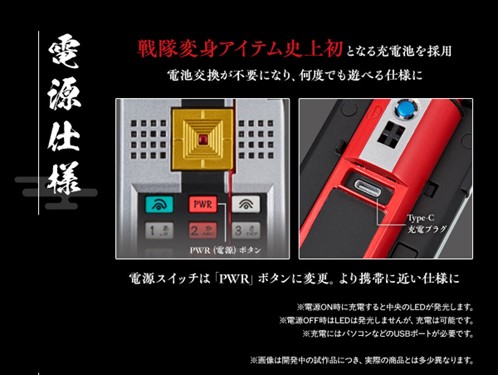
This time, we've adopted a rechargeable battery for the first time in the history of Sentai transformation items. We chose a rechargeable battery to ensure stable output of the three functions: "sound," "light," and "vibration." Using dry cell batteries would require changing the appearance due to insufficient space, and button batteries like LR44 wouldn't provide enough power and would run out quickly. Based on advice from our in-house electrical team, we decided to go with a rechargeable battery.
Furthermore, the device's power can be turned on and off by long-pressing the "PWR" keypad, similar to how it works on actual feature phones.
● About BGM
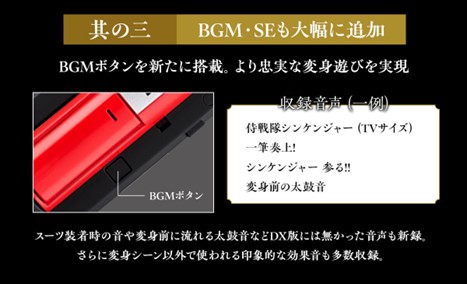
The background music includes the following three tracks!
- Samurai Sentai Shinkenger(TV size)
A written submission!
・Shinkenger is coming!!
In addition to the opening theme, we've added two more memorable songs that were used in the transformation scenes. Playing along with the background music while you transform will definitely enhance the NARIKIRI!
Furthermore, if you long-press the BGM button, the sound of the war drums from the show will play. Along with the sound of the drums that were occasionally used before the transformations, you can also feel like the lords who emerge from behind the battle curtain!
Please play this drum sound and try to become a Shinkenger from the line, "That's enough! Gedoushu!"
So far, we've introduced "ショドウフォン -MEMORIAL EDITION-" focusing on its specifications and background music!
After 15 years, the Shodophone has finally been commercialized!
I hope you'll take a look at it!
"ショドウフォン -MEMORIAL EDITION-" is
Reservations are being accepted until April 10th, 2025 at 11 PM!
I'm in charge of development for ショドウフォン -MEMORIAL EDITION- .
We would like to introduce "Shodophone -MEMORIAL DIITION-," which became available for pre-order on February 14th. This time, we will explain details that could not be included or fully conveyed on the pre-order page.
This blog documents the product development process, therefore, the product specifications and other details described in this blog may change in the future.
The final product specifications are:Product Details pagePlease check again for further details.
The final product specifications are:Product Details pagePlease check again for further details.
● Lettering gimmick
The main feature of this product is the writing game, but in the movie, the letters appear to float when written in the air. Since it is difficult to actually reproduce this effect, we considered how we could recreate the "feeling of writing" using means other than sight.
Therefore, we focused on the sense of touch, one of the five human senses. To express the resistance felt in the hand when writing, we incorporated a vibration motor inside.
It is said that the more sensory information a person receives, the greater their sense of immersion becomes.
We want to provide a more immersive writing experience by allowing users to see, hear, and feel vibrations through their fingers.
Furthermore, the -MEMORIAL EDITION- includes a new "text writing button" that was not present in the DX version!
In the DX version, the brush-writing sound would automatically start when you transformed into brush mode, but this time, we've added a character-writing button, allowing you to start writing characters at your own timing. Pressing the button once plays the sound for one stroke, so you can freely write any character you like. You can write "fire" to transform into Red, of course, but you can also write "wood" or "heaven" to transform into a different character. It might be fun to write your favorite kanji, or even katakana or English words to create your own original transformation play!
While you press this writing button, the memorable writing sound from the film and the newly added vibration will be activated. (The writing sound is based on the audio from the film, so depending on how long you hold the button down, the sound may end first. The vibration will also stop after a certain period of time.)
● Text inversion function
After finishing writing the characters, a "clang!" sound is heard as the character shakes off the Shodophone, and the written characters are reversed. Then, by pressing the call button on the edge, the scene transitions to the suit and mask being put on. We wanted to recreate the transformation scene from the show as much as possible with this Shodophone, so we made sure that this character reversal effect could be performed.
In the show, after finishing writing the characters, the character raises the Shodophone (making a movement to build momentum) and then reverses the characters. This reversal function is implemented by using the time spent raising the phone after writing the characters to differentiate the electrical processing depending on whether the time between pressing the writing button and pressing it again is short or long. The image below illustrates this.
The system works as follows: if the time between pressing the button is short, the sound of writing characters continues; if the time is long, the sound of reversing characters plays. This mechanism means that even while pressing the same button, the sound of writing characters switches to the sound of reversing characters depending on the time between pressing the button.
●Regarding each mode
Since we couldn't go into detail about this on the order page, I'd like to explain it in more detail.
Summoning Mode
Pressing the "PWR" keypad while in brush mode will activate summoning mode. This is the mode for summoning Origami, and unlike the writing sound during transformation in the show, it features a distinctive sound with a slight echo. This echoing writing sound has also been reproduced.
When summoning an Origami, the character is not reversed; simply writing the character "大" (dai) will cause the Origami to grow to a gigantic size. In this mode as well, writing the third stroke of "大" will automatically trigger the sound effect for summoning the Origami, followed by the cry of the growing Origami.
- Combined Mode
This mode allows you to perform a samurai fusion by writing the character "合" (go). Press the "2" key on the numeric keypad to switch to fusion mode.
By pressing the writing button to write characters and performing the character reversal action explained in the transformation mode, you can enjoy the Samurai Combination effect! Some of the combination sounds from the show are also included, so we hope you will enjoy becoming a Shinkenger and experiencing the Samurai Combination.
Incidentally, in this combined mode, there are no restrictions on the number of strokes you can write using the writing button, so you can write freely. You can even recreate the shortened combined form that was shown in the show with just one stroke, so you can activate the combined form at the moment you want to perform the samurai combined form!
・Mojikara Mode
This is the mode in which the Mojikara, which was frequently shown in the show, is activated. There were scenes in various situations where this Mojikara was used, such as before transforming or while fighting enemies after transforming. You can switch to this mode by pressing the "5" key on the numeric keypad.
While various types of Mojikara were used in the show, the sounds they produced when activated were also diverse. Therefore, this time we've narrowed it down to three sound patterns, and these three patterns will play in sequence. Just like with the combined mode, there are no restrictions on the number of strokes in the characters you write, so you can write characters that are meaningful to you, or you can have fun writing characters that didn't appear in the show!
・Happy ending mode
Samurai Haoh is the strongest robot from Shinkenger. Its immense size when combined truly gives off the feeling of being the ultimate final robot! This mode is accessed by pressing the "8" key on the numeric keypad.
In the grand finale mode, the Shinkengers write the names of the Origami, but there are no restrictions on the number of strokes, so please enjoy writing the names of your favorite Origami. Just like in the transformation mode, after writing the names, hold the toy once and then press the writing button again to start the reversed lettering effect. The memorable "clang, clang, clang..." sound of wooden clappers plays during the grand finale mode, so please pick it up and play with it. Also, in the grand finale mode in the show, attack sounds play after this, and the enemy is defeated. During the performance of these attack sounds, they bring out "that sword." "That sword." Which means...
- Sealed Mode
This mode recreates the strongest Mojikara used by Shinken Red, who was transformed by Kaoru Shiba, in the final stages of the series.
The scene where they sacrifice themselves to write the sealing characters truly embodies the ultimate Mojikara, and the sight of Takeru and the five Shinkengers fighting together was very impressive. This scene is closer to the image in the show, and the waiting time until the characters are reversed is longer than in transformation mode or Mojikara mode. The brush-writing sound is also a flame-filled brush-writing sound, so I think you can enjoy a different brush-writing experience from the other modes. There is no limit to the number of strokes, so please enjoy playing with the sealing characters as you like.
●Regarding rechargeable batteries
This time, we've adopted a rechargeable battery for the first time in the history of Sentai transformation items. We chose a rechargeable battery to ensure stable output of the three functions: "sound," "light," and "vibration." Using dry cell batteries would require changing the appearance due to insufficient space, and button batteries like LR44 wouldn't provide enough power and would run out quickly. Based on advice from our in-house electrical team, we decided to go with a rechargeable battery.
Furthermore, the device's power can be turned on and off by long-pressing the "PWR" keypad, similar to how it works on actual feature phones.
● About BGM
The background music includes the following three tracks!
- Samurai Sentai Shinkenger(TV size)
A written submission!
・Shinkenger is coming!!
In addition to the opening theme, we've added two more memorable songs that were used in the transformation scenes. Playing along with the background music while you transform will definitely enhance the NARIKIRI!
Furthermore, if you long-press the BGM button, the sound of the war drums from the show will play. Along with the sound of the drums that were occasionally used before the transformations, you can also feel like the lords who emerge from behind the battle curtain!
Please play this drum sound and try to become a Shinkenger from the line, "That's enough! Gedoushu!"
So far, we've introduced "ショドウフォン -MEMORIAL EDITION-" focusing on its specifications and background music!
After 15 years, the Shodophone has finally been commercialized!
I hope you'll take a look at it!
"ショドウフォン -MEMORIAL EDITION-" is
Reservations are being accepted until April 10th, 2025 at 11 PM!
Share with Friends